By
Vegard Blauenfeldt Naess
-
How the Screening module works — and who it's for
Every property has a climate risk profile. The question is whether you know what it is before you make a decision about it.
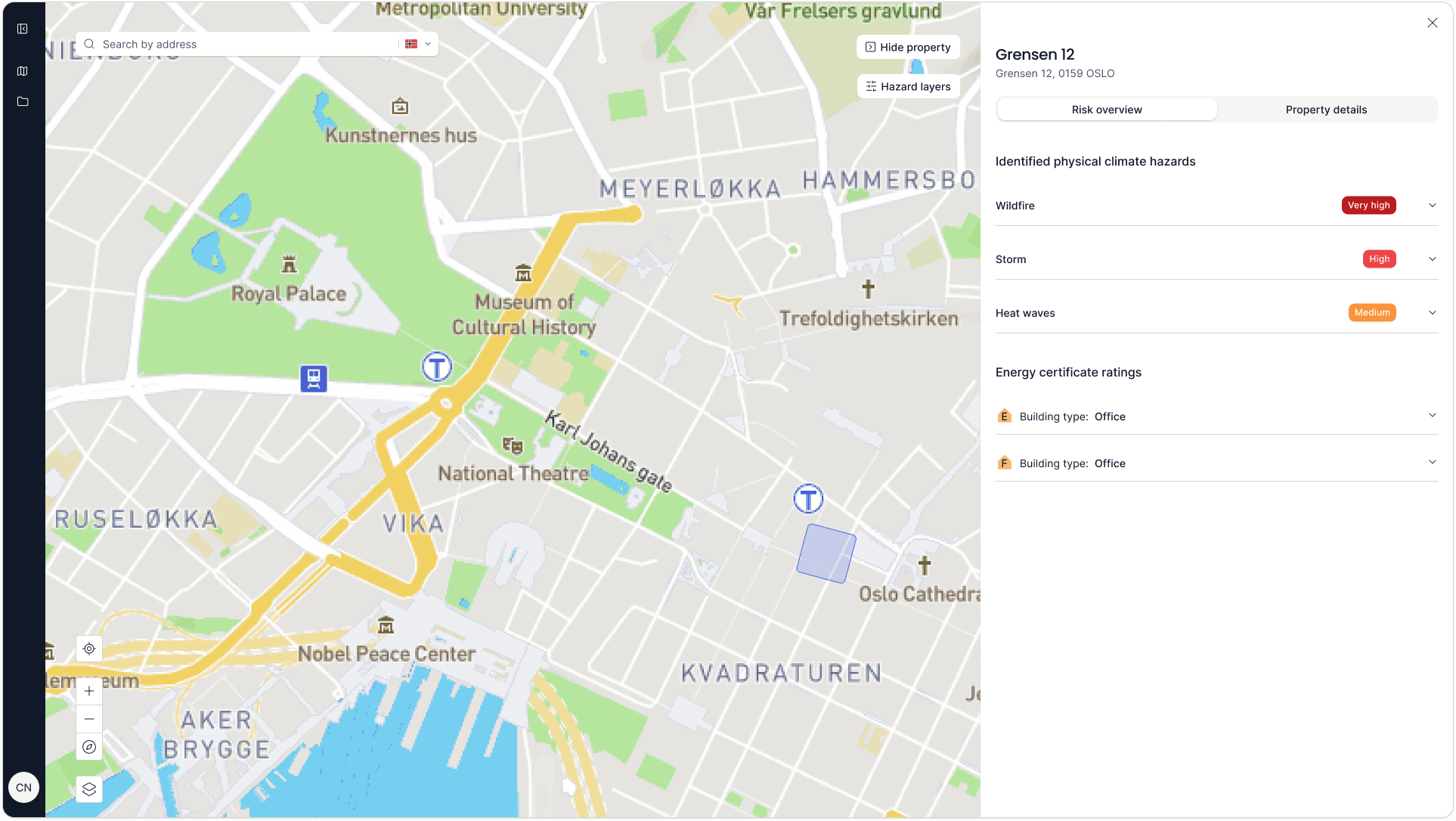
That's the problem the Telescope Screening module solves. It gives you instant, data-driven climate risk information on any property in Norway — so that when a loan application comes in, a policy is being priced, or an acquisition is being evaluated, climate risk is part of the picture from the start.
You don't need to be a climate expert to use it. You don't need to run a lengthy assessment process. You enter an address, and within seconds you have a clear risk picture you can act on.
What it shows you
At the core of the Screening module is the Telescope risk score — a single number between 0 and 10 that reflects the financial risk tied to the natural hazards a property is exposed to. A score of 7 or above indicates high risk of costly damage. A score below 3.3 indicates low financial risk from climate hazards.
Behind that number is a breakdown of every relevant hazard for that location: flooding, landslides, storm surge, coastal flooding, quick clay, storm damage, and more. Each hazard is shown with an exposure level — Not exposed, Very low, Low, Medium, High, or Very high — so you can see not just the overall score but exactly what's driving it.
The analysis is built on two automated steps from the EU Taxonomy-aligned methodology:
Pre-screening — the property is automatically checked against a full set of climate hazards. Those that aren't geographically relevant are filtered out, leaving only the hazards that actually matter for that location.
Hazard exposure assessment — for the hazards that remain, the module determines the degree of exposure using authoritative public data from NVE, DSB, Kartverket, MET Norway, and Copernicus. The result is a precise, location-specific picture of climate risk.
The output is clear, structured, and ready to use — in a client meeting, a credit memo, an underwriting file, or an investment report.
At portfolio level
The Screening module isn't just for individual property checks. At portfolio level, it gives you a birds-eye view of climate risk across your entire loan book, policy portfolio, or investment portfolio.
The analytics dashboard shows how risk is distributed across your portfolio — which hazards are most prevalent, where high-risk properties are concentrated, and how your exposure compares across segments. The concentration risk view is particularly useful for leadership and risk teams: it surfaces where climate risk is clustering, so you can act before it becomes a problem.
How different organisations use it
Banks
For a client advisor at a bank, the Screening module fits directly into the credit assessment workflow. When a loan application comes in for a property, the advisor screens the address, gets the risk score and hazard breakdown, and references it in the credit memo. Instead of noting vaguely that "climate risk was considered," there's a concrete, data-backed assessment on file.
For risk and compliance teams, the portfolio-level analytics provide a systematic overview of climate exposure across the loan book. As regulatory expectations from Finanstilsynet and the EBA tighten, having consistent, documented assessments across all credit decisions becomes increasingly important. The Screening module makes that possible without requiring climate expertise from every advisor doing assessments.
Insurance companies
For underwriters, the Screening module provides property-level climate risk data at the point of pricing. Flood exposure, landslide risk, storm surge — the specific hazards that drive claims — are visible before a policy is written.
At portfolio level, concentration risk analytics help underwriters and risk teams identify where exposure is building up across the policy portfolio. Writing too many policies on high-risk assets in the same area is a known problem in insurance. The Screening module makes that concentration visible before it becomes a liability.
Real estate investors
For investment and transaction teams, the Screening module is a due diligence tool. Before committing capital to an acquisition, you can screen the property for climate risk and flag high-exposure assets early in the process — before legal and financial due diligence is completed.
LPs are increasingly asking investment managers to demonstrate that climate risk is evaluated at the deal level. The Screening module provides that documentation: a clear, data-backed risk assessment for every asset evaluated, not just the ones that eventually enter the portfolio.
What makes it different from a full assessment
The Screening module covers the first two steps of the EU Taxonomy-aligned climate risk methodology: pre-screening and hazard exposure assessment. These steps are fully automated — the data does the work, and the output is immediate.
This is intentional. The Screening module is built for speed and integration into existing workflows. A client advisor doesn't have time to run a multi-step assessment for every loan application. An underwriter assessing multiple properties a month needs consistent, reliable data without having to commission a separate report each time. The Screening module delivers exactly that.
For organisations that need to go deeper — assessing vulnerability, documenting consequences, building transition plans — that's the territory of Voyager, Telescope's portfolio management tool for real estate companies. But for financial institutions and investors making decisions about properties they don't own or manage, the Screening module gives you everything you need at the point of decision.
The bottom line
Climate risk data used to be something you commissioned a report on. Now it's something you check in seconds, the same way you'd look up a credit score or a property valuation.
The Screening module makes climate risk a routine part of how financial institutions and investors assess properties — not a separate exercise, not a box-ticking compliance task, but a natural step in the decision process.
Want to see it in action?


Get the newsletter
Climate risk trends, product updates, and the methodology behind the numbers, straight to your inbox.
